Upload raw FITS captures directly from NINA, SGP or APT. We parse every header, match your target against 20.000+ deep-sky objects, and link each frame to the right Project and Session — fully automatic, permanent, searchable, shareable.
Watch how raw FITS files from NINA, SGP or APT are turned into a fully organized cloud-based workflow — targets auto-detected, sessions and projects built automatically, progress tracked. Zero manual entry.
This is not "yet another Dropbox". It is astrophotography-aware storage that understands your data.
A single failed drive, lost USB or reformatted NUC can wipe a season of data. Every byte is stored with triple redundancy across multiple independent data centres.
Our parser reads object name, RA/DEC from your FITS headers and matches your target against popular name, NGC, IC, Messier, Sharpless, vdB, Barnard and more — 20,000+ objects with fuzzy name lookup.
Each frame lands on the correct session in your Logbook and counts toward your project's integration progress — no manual tagging.
Upload your FITS files and the AI mechanism automatically builds Projects and Sessions from your data. Export a full JSON manifest with 4-hour presigned URLs for every file — your data, your choice, any time.
All key FITS keywords parsed: filter, exposure, gain, offset, sensor temperature, focuser position, guider RMS — ready to filter and graph in your Logbook.
A SHA-256 fingerprint catches the same sub-frame uploaded twice. It is counted once, linked everywhere, and never charged against your quota twice.
No desktop client, no sync daemon, no vendor lock-in.
Drop raw FITS files straight from NINA, SGP or APT into your browser. Multipart upload handles files well above 5 MB — no size limit beyond your plan quota.
A background worker reads every FITS header within 5 minutes, matches the target against our DSO catalogue, and links the frame to your session and project.
Everything is searchable from your Storage dashboard. Download any file at any time, or export the full manifest whenever you want.
From a drag-and-drop upload to a fully organised observation log — here is what the workflow actually looks like.
Drag raw files straight from NINA, SGP or APT into your browser. Multipart upload handles files up to 1 GB each, resumes through spotty connections, and tells you exactly which session, project and DSO every frame belongs to — before you even finish making coffee.

Browse every FITS file you have ever uploaded — across every session — in a single searchable table. Filter by project, session, status or filename; see at a glance which frames are linked, which targets they hit, and which night they came from. Bulk actions for power users.

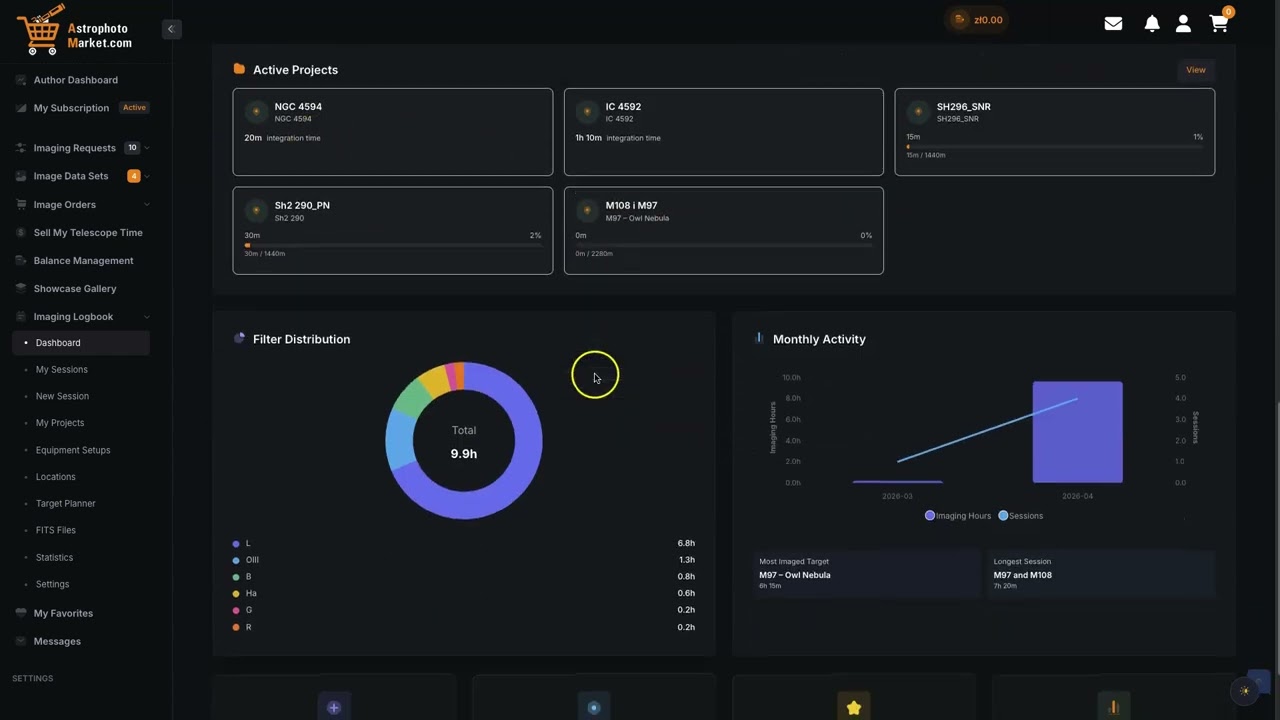
A proper imaging statistics dashboard. Total integration by filter, monthly imaging activity, your most-imaged target, your longest session — all generated automatically from the FITS headers of the files you have already uploaded. No spreadsheets, no manual tagging.

Set an integration goal for a project, point your FITS files at it, and the progress bar fills itself. Total integration, per-filter goals (L/R/G/B), linked sessions and entries — all calculated live from your uploads. You chase clear skies; the logbook does the bookkeeping.

Keep your imaging sessions and projects entirely private, or open them up for collaboration — share data with your team, invite guest observers, and build joint multi-night projects together. You decide who sees what.
Pay monthly or save with annual billing. Upgrade, downgrade or cancel anytime.
3 GB
Always free · no card required
100 GB
500 GB
1 TB
2 TB
4 TB
Remote observatory, AP group, or research team? We can provide custom quota, dedicated buckets and a custom SLA. Let's talk.
Secure payment via Stripe · cancel anytime